Domains, Hosting and Email forDental & Orthodontic Clinics
Help patients understand the practice, prepare for a visit and request the right appointment.
For independent dental practices, orthodontic clinics and community oral-health teams
Present services, practitioners and new-patient information in calm, understandable language. Separate routine appointment requests from urgent concerns, protect health information and make it clear that a public website form does not provide diagnosis, treatment advice or a confirmed appointment.
Use the matching Dental & Orthodontic Clinics workbook to shape your pages, and watch the contact video if you would like help from SaaSTech.
SAASTECH SUPPORT VIDEO
How to contact SaaSTech Servers
Need help choosing your next step? This short video explains how to contact SaaSTech Servers. Use the page plan and downloadable guide below to plan your website.
A website-planning guide in editable Word and print-ready PDF, with an example page plan, sample wording and space to draft your own content. Adapt the fictional example and confirm the details for your business.
Start with this compact structure and add pages only when they answer a distinct visitor question.
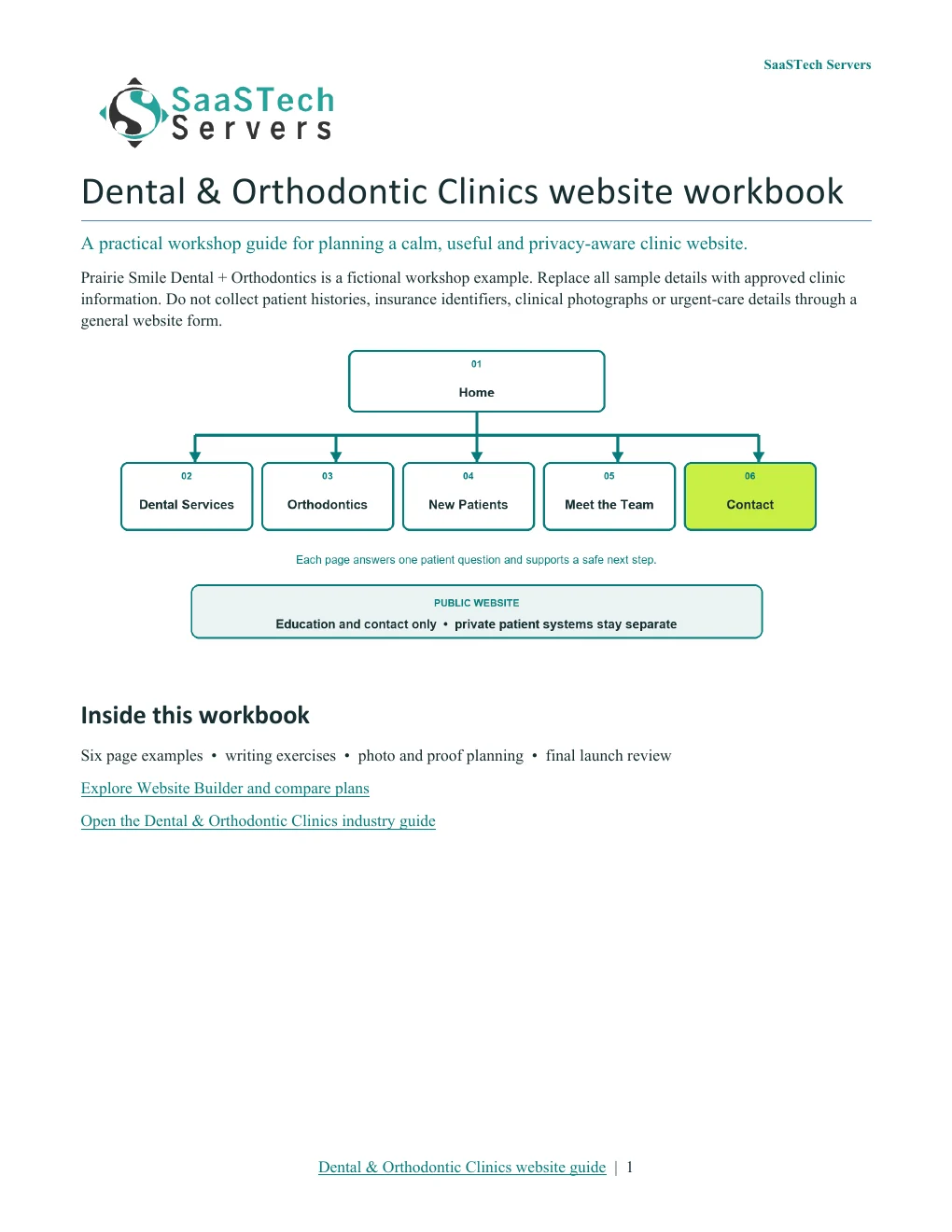
01 · HomeIntroduce Prairie Smile Dental + Orthodontics as a fictional Saskatchewan clinic. Show the care team and welcoming operatory, summarize general dentistry and orthodontics, and direct visitors to Services, New Patients or Contact & Appointments. Replace all sample details before launch. Privacy-cropped excerpt; browser/editor chrome removed.02 · Dental ServicesExplain the preventive, restorative and family dental services the clinic actually provides in plain language. Avoid diagnosing visitors, guaranteeing outcomes or publishing treatment prices that the real clinic cannot keep current. Privacy-cropped excerpt; browser/editor chrome removed.03 · OrthodonticsDescribe consultations, braces, clear aligners and follow-up care only within the clinic's verified scope. Explain that suitability, timing and fees require a professional assessment and that photographs or online enquiries are not treatment plans. Privacy-cropped excerpt; browser/editor chrome removed.04 · New PatientsExplain how to request a first visit, what identification or insurance information may be needed through an approved private process, accessibility details and what to expect. Do not collect medical histories, health-card numbers or clinical photographs through a general public form. Privacy-cropped excerpt; browser/editor chrome removed.05 · Meet the TeamIntroduce dentists, hygienists, assistants and administrative staff with permission-cleared portraits and verified qualifications. Publish professional titles, licences, memberships and languages only after the real clinic confirms them. Privacy-cropped excerpt; browser/editor chrome removed.06 · Contact & AppointmentsPublish confirmed hours, location, accessibility and contact routes. Separate routine requests from urgent dental concerns, explain when an appointment becomes confirmed and provide verified instructions for emergencies without promising immediate care. Privacy-cropped excerpt; browser/editor chrome removed.
Compare plans
Choose your Website Builder plan.
Compare current Canadian starting prices and popular features. Final promotions, taxes, currency, eligibility and terms are confirmed in the secure shop.
Suggested for Dental & Orthodontic Clinics: Business Plus. Use focused service pages, practitioner profiles and appointment requests when availability, confirmation messages and cancellation rules are configured. Clinical histories, imaging, insurance records and treatment decisions belong in the clinic's approved private systems—not an ordinary website form.
Best for Starter sites
Personal
C$8.99 / month
Professionally designed themes
Hosting, SSL and blog
Best for Business presence
Business
C$13.99 / month
Everything in Personal
PayPal and SEO
Suggested for this industryBest for Service businesses
Business Plus
C$20.99 / month
Social integration
Online appointments
Best for Selling online
Online Store
C$36.99 / month
Shopping cart and payments
Shipping and inventory
New themes
Explore every new layout without skipped rows.
Seven fully loaded, sequential captures follow the New themes collection from Aurora through Hearth. Each frame was taken after the visible preview photography finished loading, and no Paint captures are included.
Explore Prairie Smile new themes7 fully loaded captures · Open the viewer to browse the complete New themes collection.
More themes
Compare the complete standard theme collection.
Six fully loaded captures continue through the standard layouts, beginning with a dedicated Modern and Kai frame and ending with Highlight, Organic, Focus and Craft. The images stay full-width and uncropped.
Explore Prairie Smile standard themes6 fully loaded captures · Browse the complete More themes collection separately from Paint your site.
Light logo on dark themes
Keep the clinic identity readable as the background changes.
These fully loaded theme previews use Prairie Smile's transparent light logo on dark photography, deep headers and saturated colour fields. They form one separate viewer, while the regular dark logo remains in place for the live light-background design.
Preview Prairie Smile with its light logo8 contrast-checked captures · Open the viewer to compare dark and strongly coloured theme backgrounds.
Paint your site
One layout, seven colour placements—with the right logo contrast.
The viewer moves from Light through Colourful to Dark, then pairs each of the three darker placements with its corrected transparent light-logo capture.
Paint your site · position 1 of 7The lightest placement gives detailed clinic information maximum breathing room.
Earn confidence
Proof customers can evaluate.
Verified practitioner names, roles and qualifications
Clear privacy-aware appointment process
Current hours, accessibility and urgent-contact guidance
Original clinic and team photography with permission
Be discoverable
Help the right customer find you.
Use the clinic name, community and actual dental or orthodontic services consistently in page titles and local listings.
Keep practitioner profiles, hours, accessibility information and appointment routes current.
Write original service explanations in plain language and have the regulated clinic team review all clinical wording before publication.
Find your domain
It all starts with a name.
Try a .ca, or leave out the ending and we’ll help you find one that fits. The live search confirms current availability and pricing.
Explore country-code and regional domain endings with dedicated SaaSTech help articles. Registration rules and availability vary by registry and are confirmed in the secure storefront. Select an ending to open its specific help article in a new tab.
Compare current Canadian starting prices and popular features. Final promotions, taxes, currency, eligibility and terms are confirmed in the secure shop.
Suggested for Dental & Orthodontic Clinics: Business Professional. The guide uses Office apps, business email, calendars and organized documents together. Choose a lighter plan for roles that only need email or browser-based tools; confirm the features and number of users needed before ordering.
Best for Professional email
Email Essentials
C$8.99 / month
10 GB mailbox
Sync and shared calendars
Best for Larger mailbox
Email Plus
C$9.99 / month
50 GB mailbox
Sync and shared calendars
Best for Cloud teamwork
Online Business Essentials
C$15.99 / month
Office web apps and 1 TB
Meetings plus 50 GB email
Suggested for this industryBest for Full Office apps
Business Professional
C$22.99 / month
Apps on up to 5 devices and 1 TB
Meetings plus 50 GB email
Grow intentionally
Advanced options when the business is ready.
These are selective next steps—not requirements for launching the website.
Download templates branded for Prairie Smile Dental + Orthodontics. Complete the fields in Word, or print the forms and planners for handwriting. Website workbooks also include a print-ready PDF. Adapt the example branding and details for your own business.
Public website service review checklist · Page 1Prairie Smile Dental + Orthodontics · Word document preview. Download the editable file below.
Review service claims, privacy boundaries, urgent-care wording and every public next step.
Dental & Orthodontic Clinics website workbook · Page 1SaaSTech Servers · Word document preview. Download the editable file below.
A website-planning guide in editable Word and print-ready PDF, with an example page plan, sample wording and space to draft your own content. Adapt the fictional example and confirm the details for your business.
SaaSTech example templates, not official Microsoft templates. Keep confidential records in your approved private systems. These files do not connect to Website Builder or submit information.
Put the services to work
Small systems that make a real business easier to choose.
These examples connect the technology to everyday customer and team needs in dental & orthodontic clinics.
01Website Builder
Help patients choose the right next step
Separate general dentistry, orthodontics, new-patient information and routine appointment requests. Make urgent-contact instructions visible without presenting the website as clinical advice or emergency care.
02Microsoft 365
Coordinate public information safely
Use managed business identities, shared calendars and approved working documents for office communications. Keep patient records, imaging, insurance information and treatment plans in the clinic's approved clinical systems.
03Domain and business email
Make clinic messages recognizable
Use the clinic's own domain for the website and role-based addresses such as reception or appointments. Explain how patients identify legitimate messages and which private channel is used for sensitive information.
Before going live
Launch like a customer is already waiting.
Explore industries⌃AaDisplay
Text size
Appearance
Get Your Dental & Orthodontic Clinics Business Online | SaaSTech Servers