Help nearby customers quickly confirm what the store offers and when it is open.
For independent convenience stores, neighbourhood markets, rural stores, small grocers, and service-station shops
A convenience-store website should make location, current hours, contact, accessibility, everyday categories, prepared food, delivery or pickup, local products, services, and holiday changes easy to verify on a phone.
Use the matching Convenience Stores workbook to shape your pages, and watch the contact video if you would like help from SaaSTech.
SAASTECH SUPPORT VIDEO
How to contact SaaSTech Servers
Need help choosing your next step? This short video explains how to contact SaaSTech Servers. Use the page plan and downloadable guide below to plan your website.
A website-planning guide in editable Word and print-ready PDF, with an example page plan, sample wording and space to draft your own content. Adapt the fictional example and confirm the details for your business.
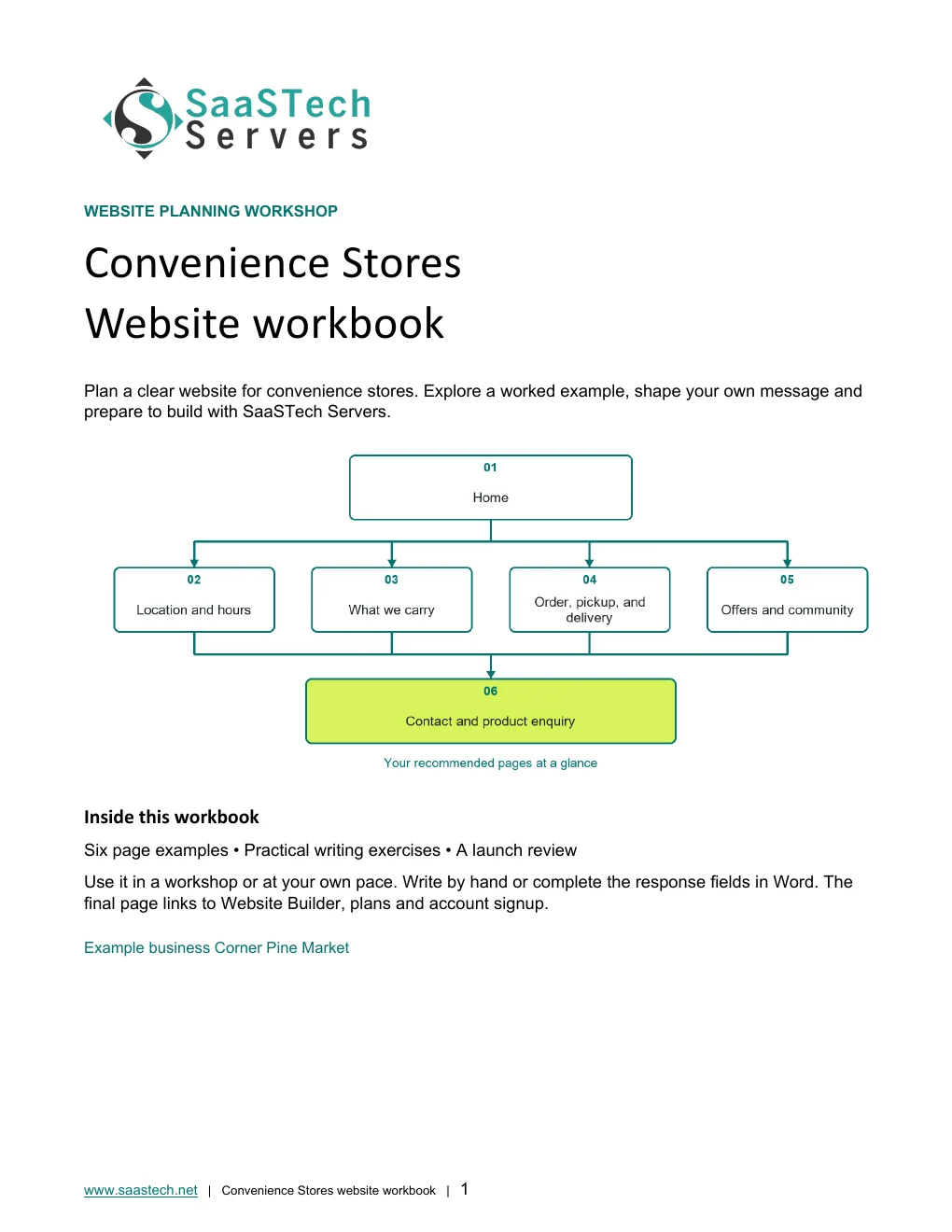
Start with this compact structure and add pages only when they answer a distinct visitor question.
01 · HomeLead with the location, current hours, strongest everyday categories, and immediate paths to directions, calling, or an available order option. Privacy-cropped excerpt; browser/editor chrome removed.02 · Location and hoursLead with a map, address, phone, regular and holiday hours, accessibility, parking, fuel or charging if applicable, and temporary closures. Privacy-cropped excerpt; browser/editor chrome removed.03 · What we carryDescribe dependable categories, prepared food, local products, household needs, seasonal items, and services without promising every item is always in stock. Privacy-cropped excerpt; browser/editor chrome removed.04 · Order, pickup, and deliveryExplain eligible products, service area, minimums, fees, substitutions, preparation times, pickup, delivery, refunds, and identification requirements. Privacy-cropped excerpt; browser/editor chrome removed.05 · Offers and communityPublish current dated promotions, store news, community involvement, local suppliers, employment information, and appropriate customer updates. Privacy-cropped excerpt; browser/editor chrome removed.06 · Contact and product enquiryProvide a fast phone-first path plus a simple form for general availability, catering trays, local products, supplier, and employment questions. Privacy-cropped excerpt; browser/editor chrome removed.
Compare plans
Choose your Website Builder plan.
Compare current Canadian starting prices and popular features. Final promotions, taxes, currency, eligibility and terms are confirmed in the secure shop.
Suggested for Convenience Stores: Online Store. The store plan can support selected products, local pickup, payments, promotions, and inventory where the operating workflow allows. Age-restricted, regulated, weight-based, or rapidly changing inventory needs careful system and legal review.
Best for Starter sites
Personal
C$8.99 / month
Professionally designed themes
Hosting, SSL and blog
Best for Business presence
Business
C$13.99 / month
Everything in Personal
PayPal and SEO
Best for Service businesses
Business Plus
C$20.99 / month
Social integration
Online appointments
Suggested for this industryBest for Selling online
Online Store
C$36.99 / month
Shopping cart and payments
Shipping and inventory
See what you can build
Explore the editor themes behind the Convenience Stores site.
These real Website Builder screens follow Corner Pine Market from guided setup to six finished pages. Distinct store photography supports current hours, product categories, pickup and delivery, offers, community involvement and product enquiries without repeating the same image.
First setup
See how the Convenience Store starter site begins.
Follow the guided sequence from the first category search through the completed first draft.
Start with the store categoryWebsite Builder begins by asking what kind of business the new site will represent.Review convenience-store suggestionsTyping the category reveals focused choices before the first draft is created.Confirm the closest fitThe selected category gives the starter site a practical neighbourhood-store direction.Name the neighbourhood marketCorner Pine Market establishes a friendly, professional identity for the demonstration.Add public contact detailsAccurate location, phone and email details make the first draft immediately useful to nearby customers.Describe what customers can expectA concise description gives the draft its service priorities, product mix and neighbourhood tone.Watch the first site take shapeThe guided setup turns the business details into an editable starting point.Review the first draftThe generated starting site is ready for real store content, branding and photography.
Editor highlights
Turn the first draft into a useful neighbourhood-store site.
The editor connects clear service details with distinct, message-matched store photography.
Refine message-matched imageryImage controls help each page use a distinct photograph that supports the surrounding message.Organize practical service detailsFlexible sections make pickup, delivery and product information easy to scan on a phone.Coordinate the store welcomeHeader options bring the logo, store photography, promise and primary action together.Build from the media libraryThe media library keeps the custom hero and supporting store images available while editing.
See what you can build
Themes and Paint your site
Open the preview to explore the captured themes, logo variations and paint settings in the image viewer.
Selected colours
Compare Corner Pine Market across professionally designed themes.
Eight sequential desktop captures show the complete theme viewer with the selected pine-green palette applied.
Chosen-colour themes 1Corner Pine Market compared across professionally designed themes with its selected pine-green palette.Chosen-colour themes 2Corner Pine Market compared across professionally designed themes with its selected pine-green palette.Chosen-colour themes 3Corner Pine Market compared across professionally designed themes with its selected pine-green palette.Chosen-colour themes 4Corner Pine Market compared across professionally designed themes with its selected pine-green palette.Chosen-colour themes 5Corner Pine Market compared across professionally designed themes with its selected pine-green palette.Chosen-colour themes 6Corner Pine Market compared across professionally designed themes with its selected pine-green palette.Chosen-colour themes 7Corner Pine Market compared across professionally designed themes with its selected pine-green palette.Chosen-colour themes 8Corner Pine Market compared across professionally designed themes with its selected pine-green palette.
Default styles
See every theme with its original styling.
Eight matching captures repeat the theme sequence with default colours, typography, navigation and buttons enabled.
Default-style themes 1The same real store content shown with each theme's original colour, typography, navigation and button treatment.Default-style themes 2The same real store content shown with each theme's original colour, typography, navigation and button treatment.Default-style themes 3The same real store content shown with each theme's original colour, typography, navigation and button treatment.Default-style themes 4The same real store content shown with each theme's original colour, typography, navigation and button treatment.Default-style themes 5The same real store content shown with each theme's original colour, typography, navigation and button treatment.Default-style themes 6The same real store content shown with each theme's original colour, typography, navigation and button treatment.Default-style themes 7The same real store content shown with each theme's original colour, typography, navigation and button treatment.Default-style themes 8The same real store content shown with each theme's original colour, typography, navigation and button treatment.
Paint your site
Choose the right balance of colour and contrast.
Seven desktop views move the same homepage sequentially from Light through Colourful to Dark, using the logo variation with the clearest contrast.
Paint position 1 of 7 · LightDesktop slider position 1 of 7, moving Corner Pine Market sequentially from Light through Colourful to Dark.Paint position 2 of 7 · Light toward colourfulDesktop slider position 2 of 7, moving Corner Pine Market sequentially from Light through Colourful to Dark.Paint position 3 of 7 · Colourful with a light baseDesktop slider position 3 of 7, moving Corner Pine Market sequentially from Light through Colourful to Dark.Paint position 4 of 7 · Colourful midpointDesktop slider position 4 of 7, moving Corner Pine Market sequentially from Light through Colourful to Dark.Paint position 5 of 7 · Colourful with a dark baseDesktop slider position 5 of 7, moving Corner Pine Market sequentially from Light through Colourful to Dark.Paint position 6 of 7 · Dark toward colourfulDesktop slider position 6 of 7, moving Corner Pine Market sequentially from Light through Colourful to Dark.Paint position 7 of 7 · DarkDesktop slider position 7 of 7, moving Corner Pine Market sequentially from Light through Colourful to Dark.
Earn confidence
Proof customers can evaluate.
Accurate hours and location information
Current service and product-category descriptions
Real store and prepared-food photography
Clear pickup, delivery, substitution, and refund expectations
Be discoverable
Help the right customer find you.
Keep the business profile, map listings, website hours, and holiday notices consistent.
Create useful pages for dependable services such as prepared food, local products, delivery, pickup, or fuel.
Date promotions and remove expired offers rather than leaving customers to guess.
Find your domain
It all starts with a name.
Try a .ca, or leave out the ending and we’ll help you find one that fits. The live search confirms current availability and pricing.
Explore country-code and regional domain endings with dedicated SaaSTech help articles. Registration rules and availability vary by registry and are confirmed in the secure storefront. Select an ending to open its specific help article in a new tab.
Compare current Canadian starting prices and popular features. Final promotions, taxes, currency, eligibility and terms are confirmed in the secure shop.
Suggested for Convenience Stores: Business Professional. The guide uses Office apps, business email, calendars and organized documents together. Choose a lighter plan for roles that only need email or browser-based tools; confirm the features and number of users needed before ordering.
Best for Professional email
Email Essentials
C$8.99 / month
10 GB mailbox
Sync and shared calendars
Best for Larger mailbox
Email Plus
C$9.99 / month
50 GB mailbox
Sync and shared calendars
Best for Cloud teamwork
Online Business Essentials
C$15.99 / month
Office web apps and 1 TB
Meetings plus 50 GB email
Suggested for this industryBest for Full Office apps
Business Professional
C$22.99 / month
Apps on up to 5 devices and 1 TB
Meetings plus 50 GB email
Grow intentionally
Advanced options when the business is ready.
These are selective next steps—not requirements for launching the website.
Download templates branded for Corner Pine Market. Complete the fields in Word or the input cells in Excel, or print the forms and planners for handwriting. Website workbooks also include a print-ready PDF. Adapt the example branding and details for your own business.
Shift scheduleCorner Pine Market · Excel workbook preview. Download the editable file below.
SaaSTech website planning workbook · Page 1SaaSTech Servers · Word document preview. Download the editable file below.
A website-planning guide in editable Word and print-ready PDF, with an example page plan, sample wording and space to draft your own content. Adapt the fictional example and confirm the details for your business.
SaaSTech example templates, not official Microsoft templates. Keep confidential records in your approved private systems. These files do not connect to Website Builder or submit information.
Put the services to work
Small systems that make a real business easier to choose.
These examples connect the technology to everyday customer and team needs in convenience stores.
01Domain
Make local information easy to verify
Use the store domain on receipts, signs, local listings, flyers, delivery material, community sponsorships, and email.