
INDUSTRY VIDEO
Computer & IT Support Services Website Guide
Start here for a practical tour. Once opened, the player follows as you move through the guide and can be returned to its place at any time.
Continue to the recommended structure →
Get your business online
Turn a technology problem into a clear, trustworthy next step.
For independent computer technicians, managed IT providers, repair shops and small-business technology consultants
Explain who you help, what support you provide and how a customer starts safely. Separate urgent support, planned projects and device repair so visitors know what information to share—and what should never be entered into an ordinary website form.
Video overview and workbook
See how the website, business tools and customer journey fit together, then use the matching Computer & IT Support Services workbook to shape your own pages.
Start here for a practical tour. Once opened, the player follows as you move through the guide and can be returned to its place at any time.
Continue to the recommended structure →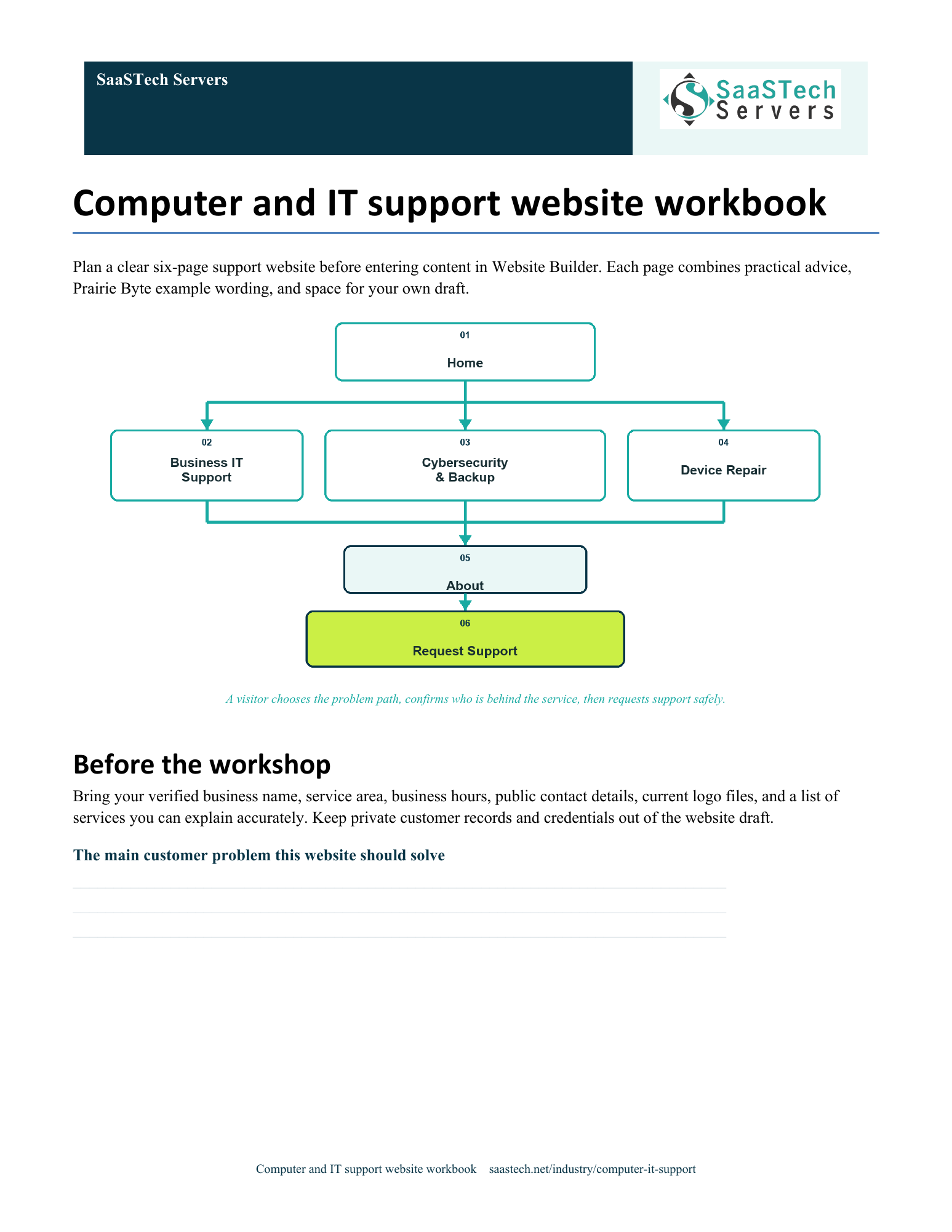
A website-planning guide in editable Word and print-ready PDF, with an example page plan, sample wording and space to draft your own content. Adapt the fictional example and confirm the details for your business.
View all templates and resources →Recommended structure
Start with this compact structure and add pages only when they answer a distinct visitor question.

Website Builder walkthrough
Open one screenshot, then move through the single viewer. Theme choices are shown in sequence, followed by Paint your site. The finished-page gallery above pairs every desktop page with its mobile preview.
Earn confidence
Be discoverable
Find your domain
Try a .ca, or leave out the ending and we’ll help you find one that fits. The live search confirms current availability and pricing.
Explore country-code and regional domain endings with dedicated SaaSTech help articles. Registration rules and availability vary by registry and are confirmed in the secure storefront. Select an ending to open its specific help article in a new tab.
Where SaaSTech fits
The website strategy comes first. These services provide a practical foundation and can be adjusted for the business.
Choose a short, memorable name that belongs to the business and can be used for both the website and email.
Explore service →FOUNDATIONUse focused service pages, a short support-request form and appointment requests for planned consultations when availability and confirmations are configured. Passwords, remote-access codes, private files and security incidents belong in an approved secure support process—not a public website form.
Explore service →FOUNDATIONUse the business domain for email, calendars, meetings, Office apps, and organized customer communication.
Explore service →Download templates branded for Prairie Byte IT Services. Complete the fields in Word or the input cells in Excel, or print the forms and planners for handwriting. Website workbooks also include a print-ready PDF. Adapt the example branding and details for your own business.
A printable, privacy-aware worksheet for gathering non-sensitive request details, routing work, recording the next safe step and completing the customer handoff.
Track ten practical onboarding steps, owners, due dates, completion status, verification and handoff notes without storing credentials.
Record backup scope, ownership, frequency, recovery-test results, review dates and actions while keeping credentials and recovery data in approved systems.
A website-planning guide in editable Word and print-ready PDF, with an example page plan, sample wording and space to draft your own content. Adapt the fictional example and confirm the details for your business.
SaaSTech example templates, not official Microsoft templates. Keep confidential records in your approved private systems. These files do not connect to Website Builder or submit information.
Put the services to work
These examples connect the technology to everyday customer and team needs in computer & it support services.
Separate business support, cybersecurity, backup and device repair, then connect each page to one privacy-aware request. The form starts a conversation; it does not grant remote access or confirm a repair.
Use managed business identities, shared calendars and approved working documents for scheduling and follow-up. Keep passwords, customer files and privileged access in the provider's approved secure systems.
Use the provider's own domain for the website and role-based addresses such as support and billing. Explain how customers verify a genuine message before following links or sharing access.
Before going live